Apps that extend Business Central
Purpose-built extensions that solve recurring finance and warehouse problems, developed to AppSource standards and backed by automated tests. Period Close Hub, Finance Performance Hub and Warehouse Operations are live on Microsoft AppSource, and every app is available for a demo.
Period Close Hub
A period close cockpit inside Business Central. It shows everything still open at your cut-off date, reconciles every subledger to the G/L, explains each difference, and produces a signed-off, audit-ready close pack.
Built for finance teams that need a faster close and a clean audit trail.
- One cockpit, every areaG/L, AR, AP, Inventory, Warehouse, Banking and GST/VAT, plus optional Fixed Assets, Projects and Service, and an information-only System Security & Review. For Business Central online in Australia and New Zealand.
- Subledger to G/L reconciliationWorksheets reconcile each subledger to its control accounts and rate every area Balanced, Explained or Action Required.
- Differences explainedManual G/L postings, date mismatches, posting group changes, setup mapping and cost not posted to G/L are identified line by line.
- Acknowledge with reason codesReviewed items are acknowledged with a mandatory reason code and comment, so every exception has a documented reason.
- Prepare & review sign-offEach area is marked prepared and reviewed, then the month is signed off with a locked snapshot of the numbers.
- Period Close PackAn audit-ready report in PDF or Excel, at summary, standard or detailed level, including items acknowledged by reason code.
- Full audit trailThe Period Close Log records status changes, acknowledgements, setup changes and period closing, with user and time. Entries can't be edited.
- Starting point & roll-forwardGo-live and legacy differences are brought forward as opening balances. Back-dated postings into a closed period are flagged.
- Period Close ChecklistLive progress, for example "6 of 8 areas ready", showing who prepared and reviewed each area.
- Close the posting periodOne click moves Allow Posting From once every area is reconciled, optionally only after the month is signed off.
- Drill to the sourceEvery tile opens the exact entries, documents or journal lines behind it, with both sides of the G/L posting.
- Read-only & safeNever posts, adjusts or deletes business data. Actions open standard Business Central pages for you to run.
What's in the Close Pack
For a signed-off month the close pack always reprints the signed-off snapshot, even after later postings. Before sign-off it prints as a DRAFT. Every print is recorded in the log.
Period & sign-off
Company, cut-off date, sign-off status, preparer and reviewer for each area, and any reopen with its reason.
Reconciliation
G/L against subledger for each control account, with opening differences and the settings used.
Differences & reason codes
Each difference with its reason code and comment, and a summary of acknowledged items and amounts by reason code.
Audit log
The Period Close Log for the period, with who did what, when and why. Included at the detailed level.
Finance Performance Hub
Finance dashboards, forecasts and alerts inside Business Central. One hub shows how the business is tracking against budget or last year, where the cash is going and what needs attention, without Power BI.
Built for finance managers, CFOs and owners who want the month's story without building reports. For Business Central online in Australia.
- Executive reportOne page with the headline KPIs, a financial health scorecard, commentary, open alerts, the year-end outlook and what-if sliders.
- FinanceIncome statement and balance sheet that open out to G/L accounts, cash flow, budget against actual, and ratios.
- Receivables & payablesAgeing that follows the Business Central aged reports, what falls due next, late payers and top balances.
- Sales & purchasingCustomers, items and margin, salespeople against target, the order and quote pipeline, spend, vendor reliance, prices and lead times.
- Cash & GSTA 13-week cash forecast, cash in and out, an obligations calendar for tax, super, payroll and fixed payments, and BAS figures by quarter.
- Dimensions & commitmentsThe P&L by any dimension, a two-dimension matrix, and budget less spent less on order.
- ForecastsRevenue and cash forecasts with a range, built from your own history, and a page that shows how close past forecasts were.
- AlertsPossible duplicate bills, unusual amounts, sustained cost increases, weekend or overnight journals and customers paying later than before. See them in Business Central, by email or in Teams.
- Monthly pack & ExcelA PDF pack you can email each month, plus P&L, sales and aged balances in Excel.
- Drill to the sourceEvery figure shows how it is calculated, and a click opens the entries behind it.
- Read-only on your business dataIt never posts and never creates or changes documents, journals, ledger entries, budgets or master data. It writes only its own tables and schedules its own job queue entries.
What your team sees
Ten areas across the top, a few large tiles on each page, and the same month and comparison on every page.
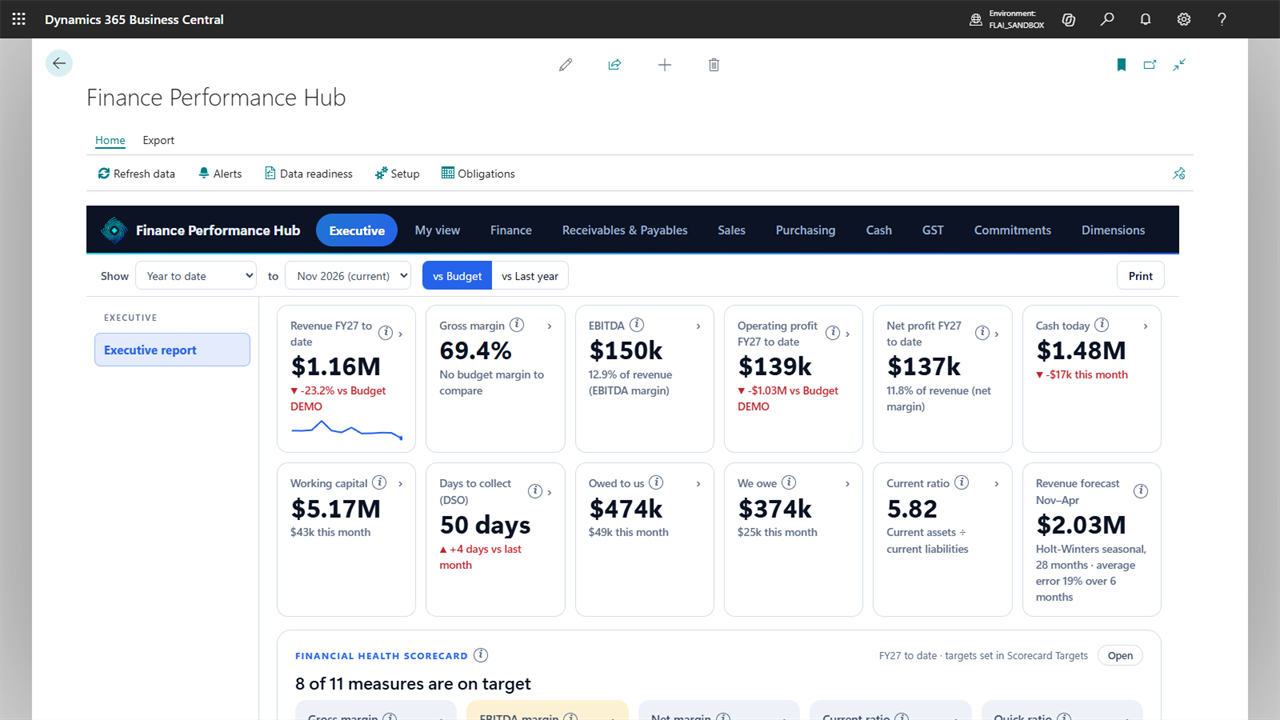
Executive report
Headline KPIs, the financial health scorecard, commentary, alerts and the year-end outlook on one page.
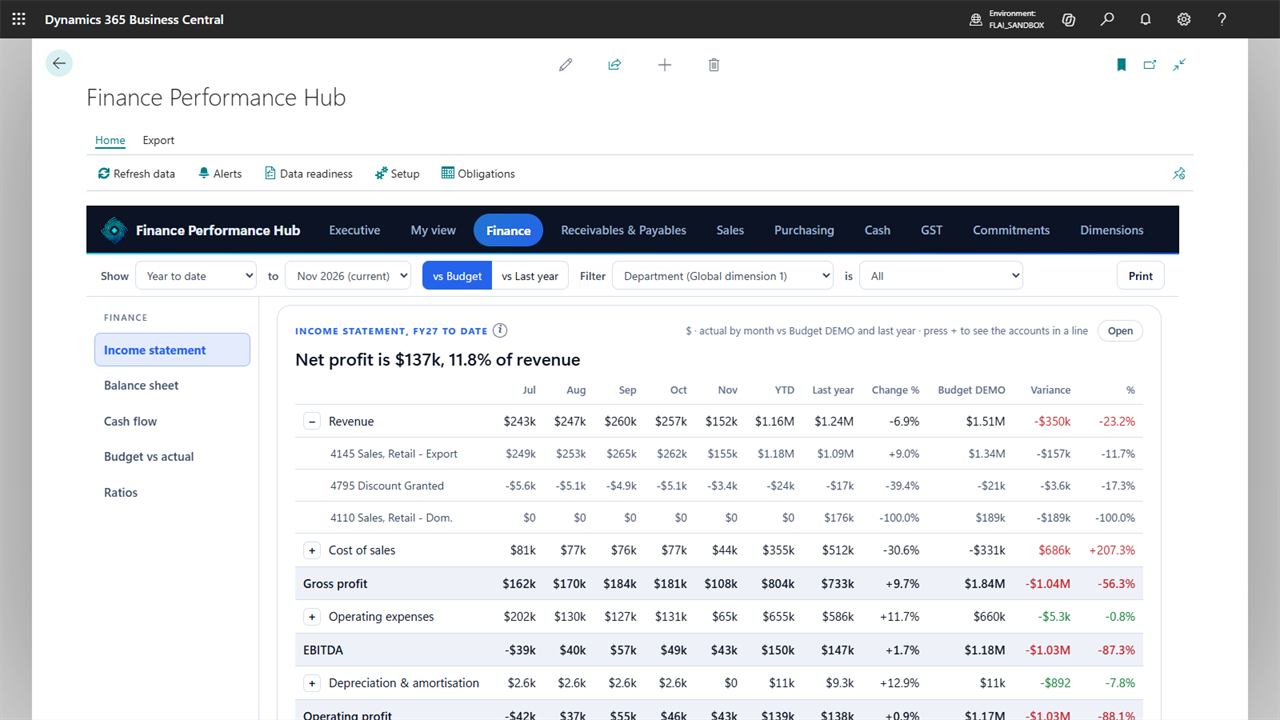
Finance
Income statement, balance sheet, cash flow, budget against actual and ratios.
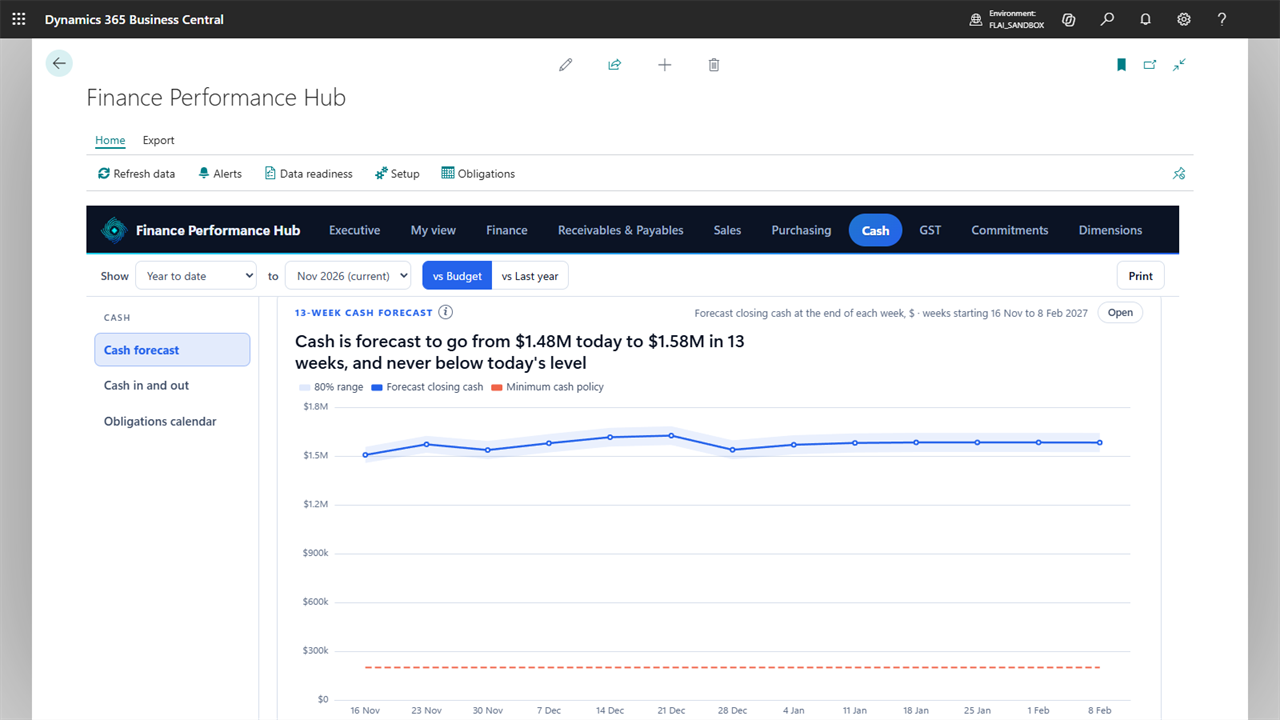
Cash forecast
Thirteen weeks ahead, with a range, your minimum cash line and the payments you know are coming.
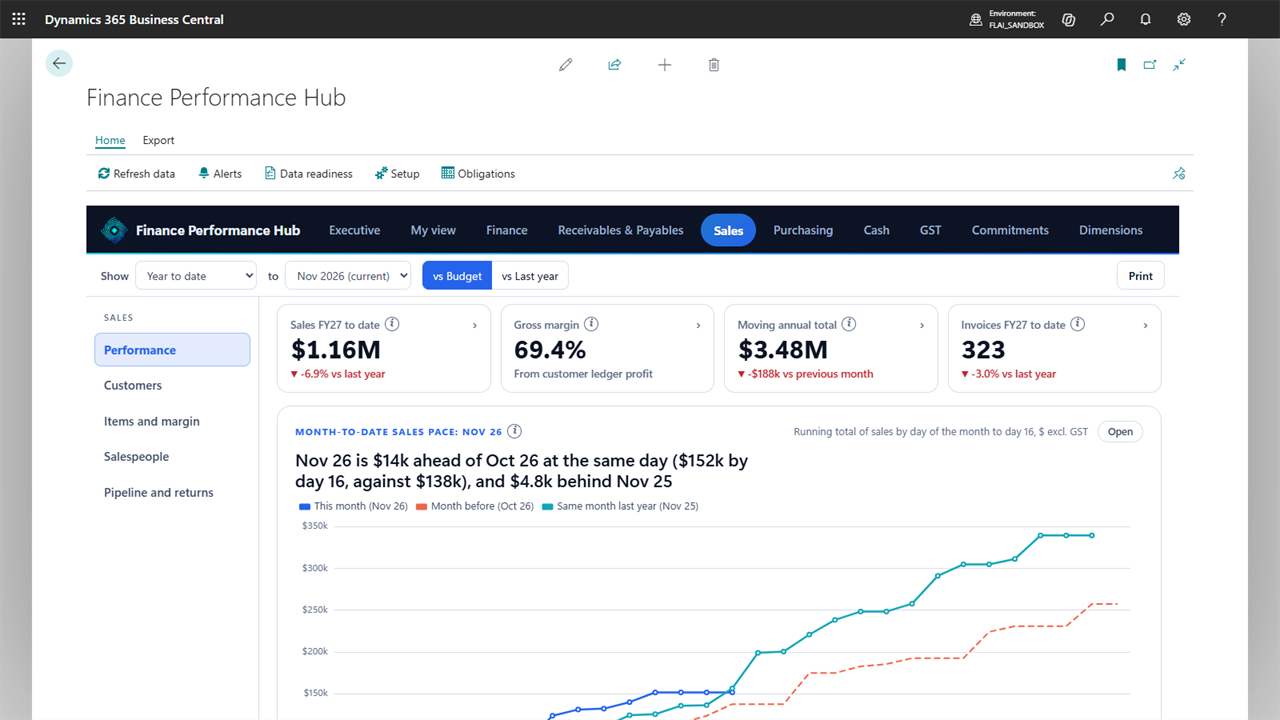
Sales
Customers, items and margin, salespeople against target and the pipeline.
Warehouse Operations
Live warehouse dashboards for Business Central, at a desk, on a phone and on the warehouse TV. See today's picks, pick rate, target pace, dispatch and KPIs as they happen, instead of waiting for a report.
Built for warehouse managers and team leaders of distributors and manufacturers, with or without scanners.
- Live dashboardPicks, pick lines, units and pick rate today against the previous day and the daily target, by hour and by person, with live alerts.
- Operator performancePicks, pick rate, accuracy and idle time per person against KPI limits for their role, with profiles, badges and coaching notes.
- Dispatch & inboundOrders due today, orders late after the courier cut-off, and the purchase receipts expected.
- KPI Board & TV modeTraffic-light KPIs, and a full-screen TV that rotates the screens you choose and shows first names only.
- Trends, insights & planningUp to twelve months of history, labour cost per line, busiest hours, next week's expected workload, ABC items and busiest bins.
- Scanner logins to peopleShared scanner logins are mapped to the people using them, with history, so every number belongs to the right person.
- Every warehouse setupDirected put-away and pick, warehouse shipments and picks, inventory picks, or no warehouse documents at all.
- No extra licencesRuns as Power Apps on the standard Business Central connector: no Power Apps Premium, Power BI or per-device licences.
- Read-only & safeNever posts or changes documents, ledgers or setup. It writes only its own activity log in Business Central.
What your team sees
The same live figures on a manager's desk, a supervisor's phone and the TV on the warehouse wall. Screenshots use demo data.
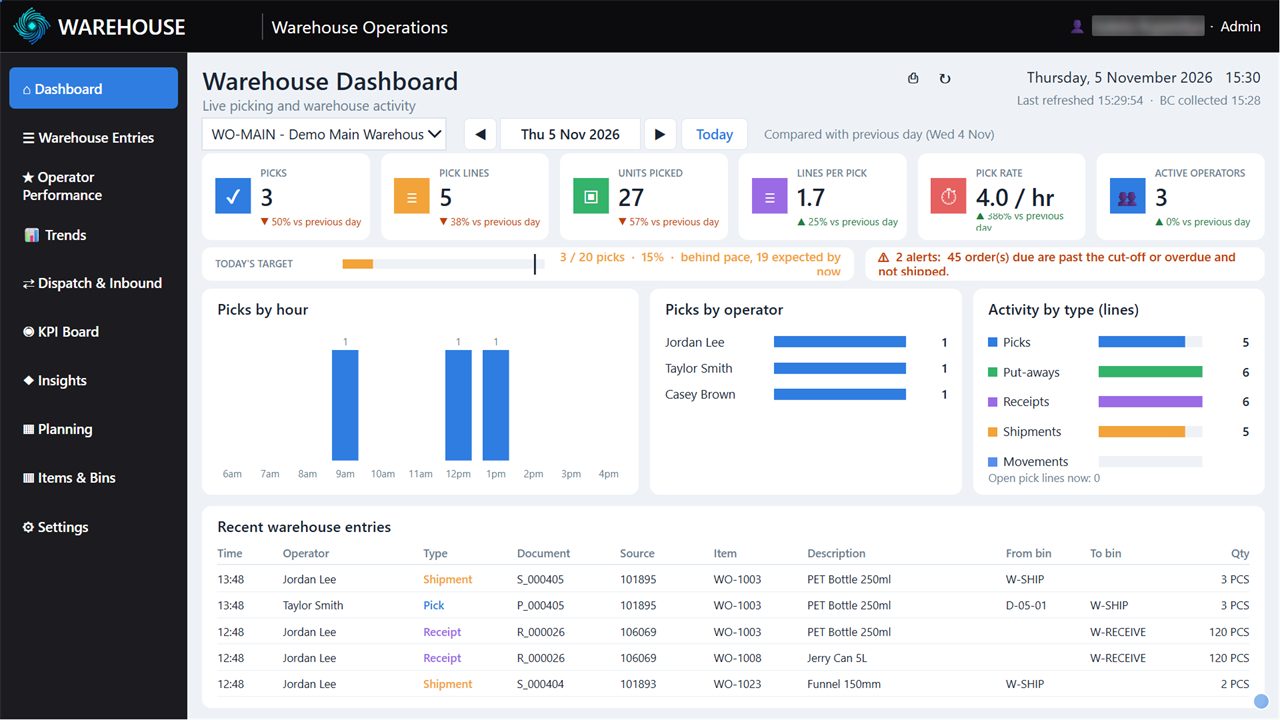
Live dashboard
Today's picks, pick rate and target pace, by hour and by person, with alerts.
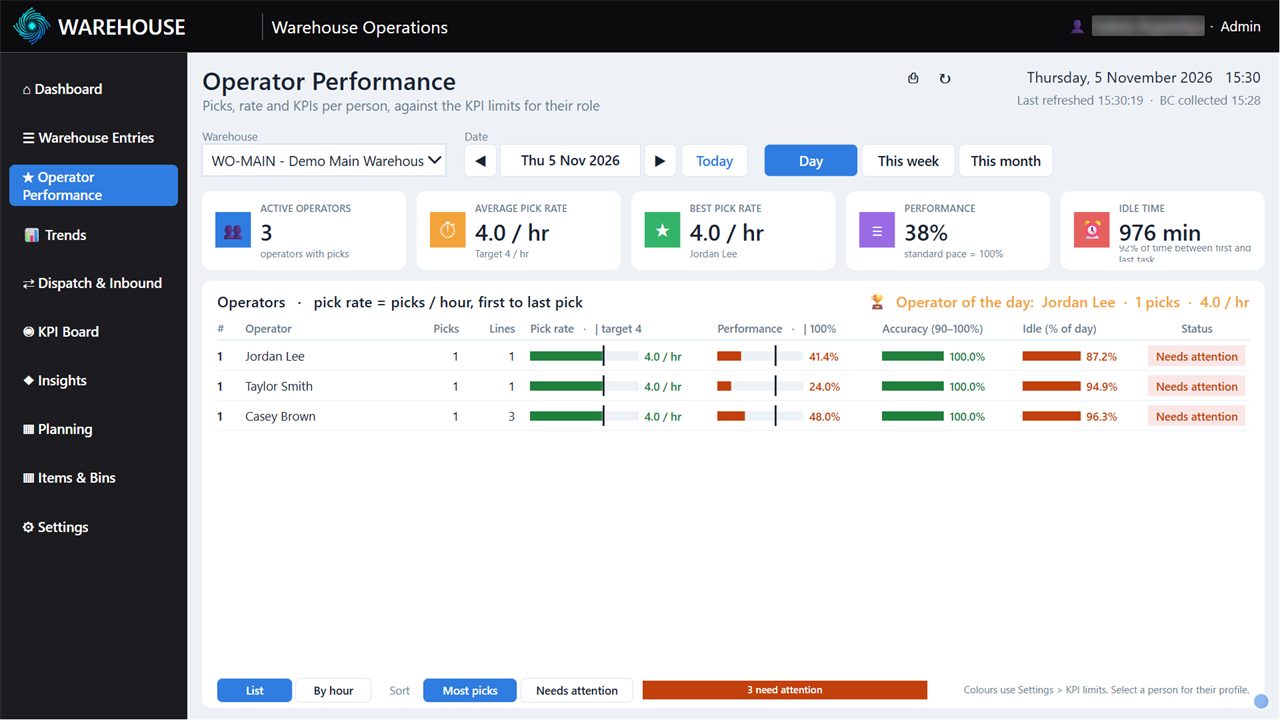
Operator performance
Each person's picks, pick rate, accuracy and idle time against the limits for their role.
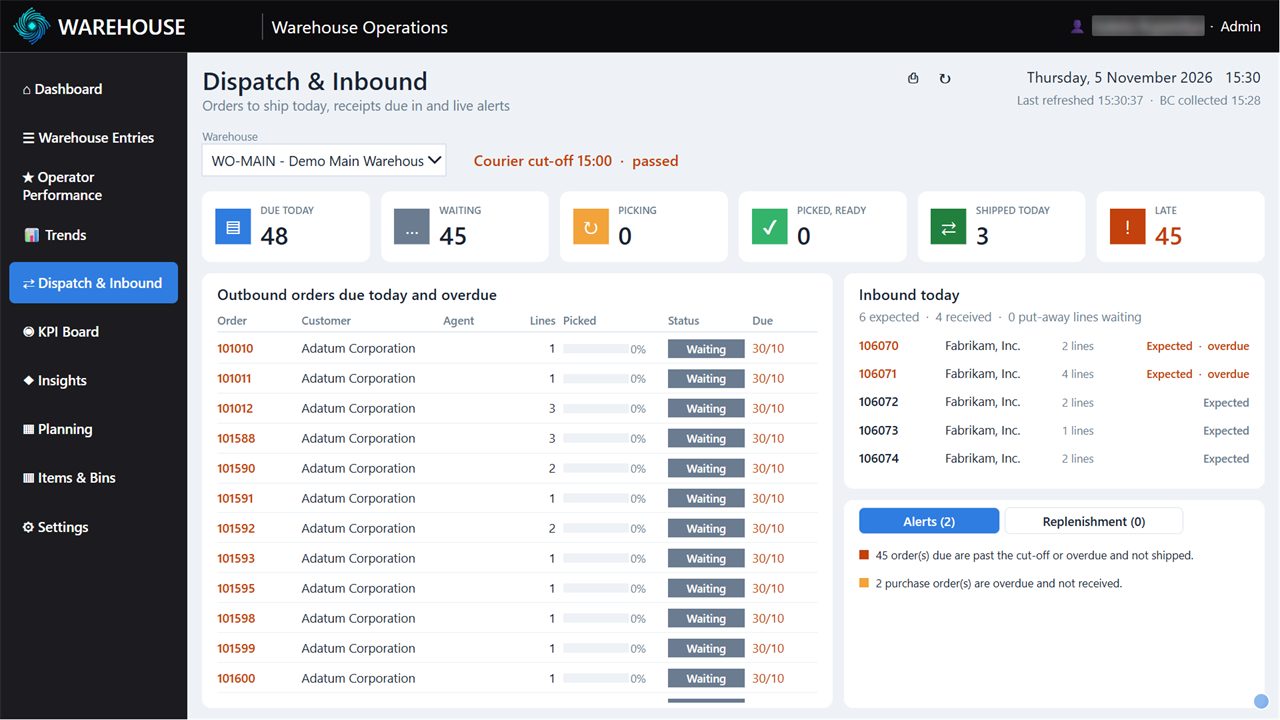
Dispatch & inbound
Orders due today, orders late after the courier cut-off, and receipts due in.
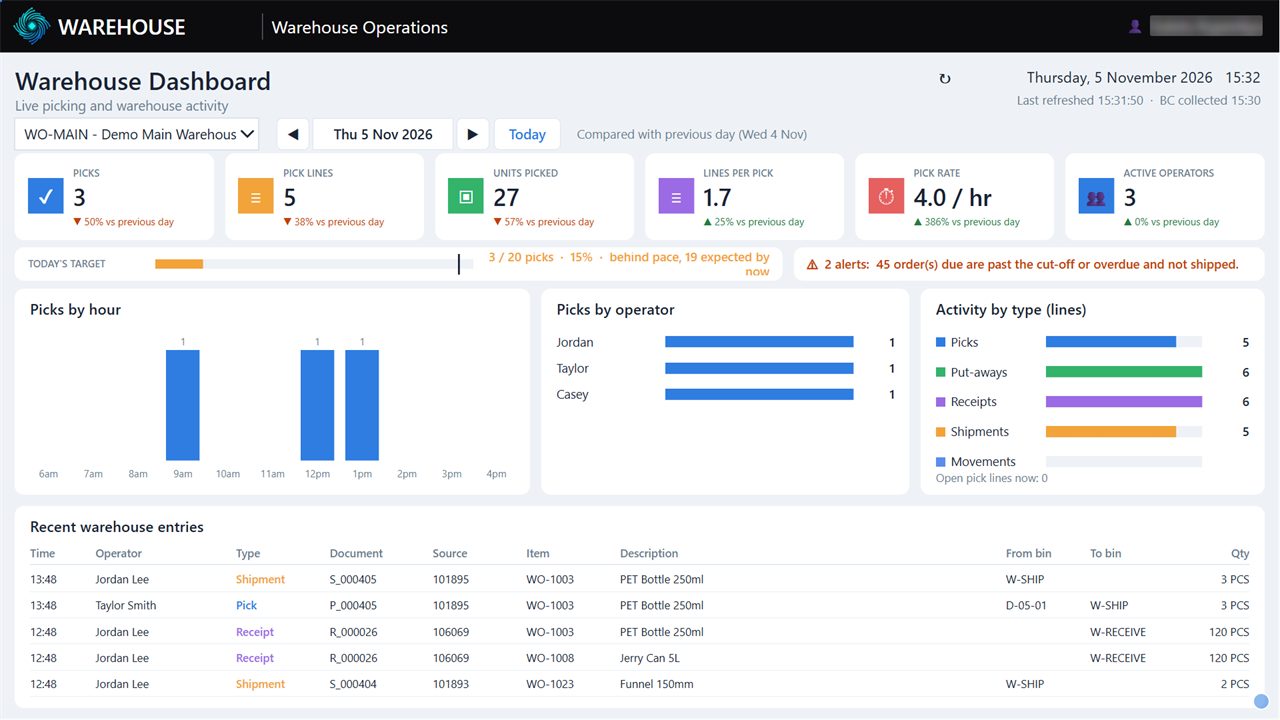
Warehouse TV
Full screen on the wall, rotating the screens you choose, first names only.
Multi-company Consolidated Reporting
Group-wide reporting for organisations running several Business Central companies, starting with receivables and payables, without spreadsheets stitched together by hand.
Request a demo- Consolidated aged AR & APAgeing across all companies in the group in a single report.
- Group customer hierarchyRoll up related customers to see true exposure by group.
- Excel group packsFormatted Excel output ready for management and board packs.
- API & Power BIAPI pages feed Power BI dashboards with consolidated data.
- Scheduled snapshotsAutomatic email of ageing snapshots on your schedule.
- Tested & maintainedAutomated test suite runs on every build via AL-Go for GitHub.
Have a different problem?
Most of our apps started as a single client's request. If Business Central doesn't do what you need out of the box, we can build it.
Industry integrations
Integrations for manufacturing, chemicals, life sciences and distribution, connecting Business Central to specialist operational systems.
Process automation
Approvals, document flows and scheduled jobs that remove manual steps from finance and operations.
See it in action
Book a demo and we will walk you through the apps, or install them in a sandbox so your team can try them with your own data.